The FitCertain reference
Where to Find Your Appliance Model Number
Find accessible model labels on dryers, washers, dishwashers and ranges. Use manufacturer location guides and keep every model suffix when checking parts.
Jump to a section
Read the model field, not the serial
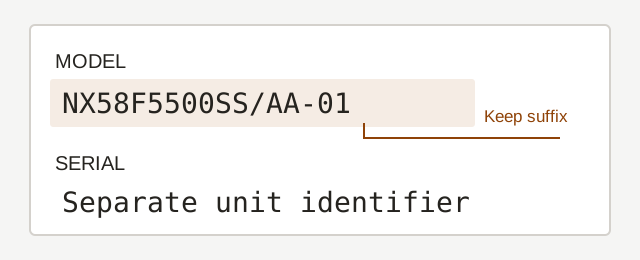
Different versions may use different parts. On Samsung labels, check the version number in the small box to the right of the model number. Keep every zero: -03 and -0003, or -00 and -0000, are separate catalog entries. A family name without a version is only a lead; it does not confirm fit. Do not assume that a catalog using a different version spelling describes the same parts.
Use the field labeled Model, Model No. or MOD. Keep the slash, dot, dash and final revision characters. A series name, warning label or number molded into a part may identify something else. Photograph the whole label before copying it.
Dryer: check the open door area
Whirlpool directs owners to the opening rim inside the dryer door. GE lists the front face inside the compartment, at either side of the opening. Look only with the dryer stopped. Some designs differ: use the brand guide if the accessible door area has no label.
Washer: distinguish front-load from top-load
For a Whirlpool front-loader, inspect the opening rim inside the door; for a top-loader, inspect the tub rim under the lid. GE front-loader guidance includes the compartment face inside the door, while its top-loader guide includes a location under the lid near the right hinge. These are starting points for those brands, not a universal label position.
Dishwasher: inspect the accessible front edges
With the dishwasher stopped and cool, inspect the front tub and door edges. Whirlpool lists the left tub frame for built-in models. GE lists the left or right front inside edge and the right door edge. Do not pull a built-in machine out just to locate a label.
Range: begin with the front frame
For GE ranges, the locator includes the frame behind the oven door and the front frame inside the drawer area. Inspect only accessible surfaces with controls off and the appliance cool. GE also lists other design-specific locations; follow its guide rather than lifting a cooktop, moving the range or removing a panel to search. For another brand, use its own locator or manual.
If the label is missing or unreadable
Check similar characters such as 0/O and 1/I in the photograph. Do not remove a suffix to obtain a match. Ask manufacturer support to identify an unreadable label from your documents and accessible photographs. Stop if finding it requires moving a heavy appliance, disconnecting utilities or opening a service compartment.
Use the complete model for the next check
Search the complete model or enter it on a part page. A missing result means our reviewed catalog has no verified match; it does not establish incompatibility. A Kenmore date code can help identify the appliance, but cannot create part-fit evidence.
Sources to check
Reviewed October 21, 2026. Use the manual for your exact model; catalog information is not a physical fit test.
Editorial update: 2026-10-21